
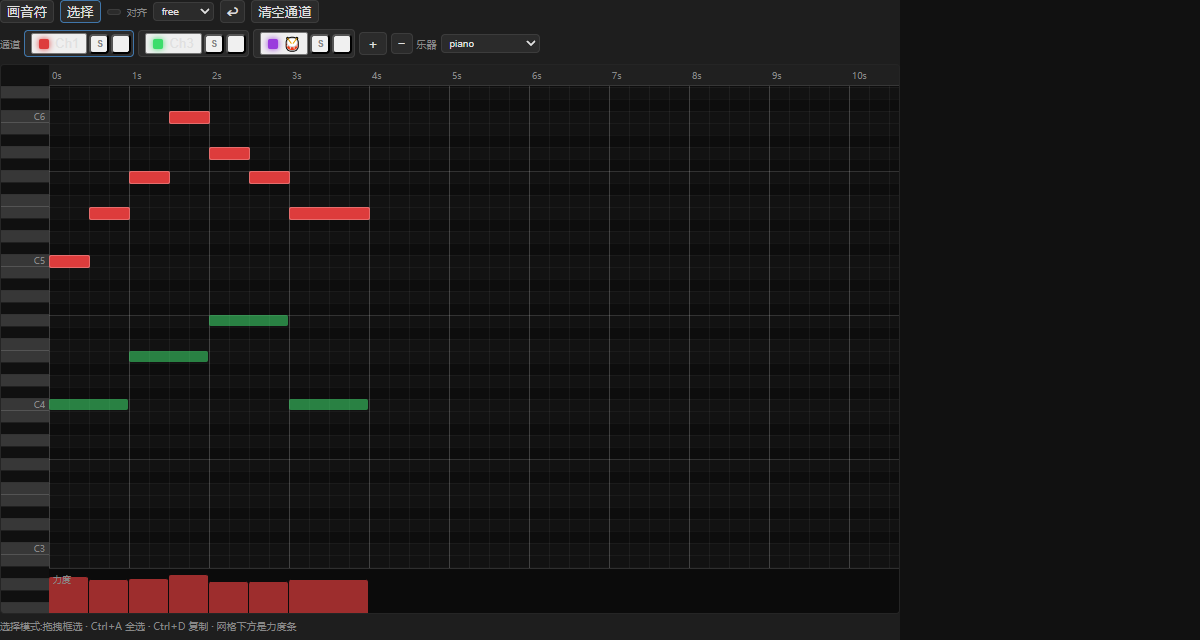
MIDI Editor in ComfyTV
What this node does
MIDI Editor is an in-browser piano roll that works in the time domain (seconds) rather than beats — the horizontal grid is real time, so it’s built for editing actual MIDI performances. You draw notes on the grid, organize them into MIDI channels (each with a General MIDI instrument, plus a dedicated drum channel), mute/solo channels while you work, and shape velocity. Press ▶ Run to write a Standard MIDI File on the backend; themidi
output is a COMFYTV_AUDIO payload pointing at the exported .mid. Running
with an empty roll fails with “the piano roll is empty”.
You can import a wired MIDI file (midi input, COMFYTV_AUDIO) into the roll —
its channels, programs and tempo map come in, ready to edit.
The editor
The card is a toolbar-plus-piano-roll, laid out in the time domain. Tool row.- Draw / Select — the two editing modes.
- Draw: click-drag on the grid to create a note; the drag sets its duration and it beeps as you place it.
- Select: drag a marquee to select (Shift adds); click a note to grab it.
- Play (▶ / ■) — plays the roll with a built-in oscillator/drum synth using look-ahead scheduling; a green playhead sweeps in real time and muted channels stay silent.
- Snap — time snapping: free, 10ms, 50ms, 100ms, 250ms, or 1s.
- Undo (↩), Clear channel, and (when a MIDI file is wired) Import MIDI. Import errors show here.
Ch1…), or 🥁 for the drum channel (channel 10 / index 9). Per chip:
- click the chip to make that channel active,
- S solos the channel (mutes all others),
- the volume icon mutes/unmutes it,
- hovering a chip highlights just that channel in the roll (others dim). + adds a channel, +🥁 adds the drum channel (only if there isn’t one), − removes the active channel. For non-drum channels, an Instrument dropdown sets the General MIDI program.
- moved by dragging the body,
- resized from the left or right edge handle,
- deleted by double-clicking,
- multi-selected and edited together. Notes on inactive channels appear as dim “ghost” blocks in their channel color. A velocity lane along the bottom paints 0–127 velocity for the notes under the cursor.
Workflow / step by step
- (Optional) wire a MIDI file and press Import MIDI to load its channels, programs and tempo map.
- Pick a Snap value; select a channel and set its Instrument (or add 🥁 for drums).
- Draw or edit notes; drag the edge handles to trim durations.
- Use S/mute on channels to isolate parts while you work; shape dynamics in the velocity lane.
- Press Play to audition; use ghost notes to align across channels.
- Press ▶ Run to export the midi file, then feed it to Score Synth (to render audio) or download it.
Inputs and outputs
The roll (events, channel programs and tempo map) is stored on the node in a
hidden
events_json field, so it’s saved with the workflow. Mute/solo state is
a live playback aid and is not part of the export.
Tips
- This is the seconds-domain editor — positions are real time, not beats. For beat/bar composing that becomes MusicXML, use Score Editor instead.
- Solo (S) is the fast way to hear one channel; it mutes everything else until you toggle it off. Mute/solo only affects the in-editor preview, not the exported file.
- Importing a MIDI file brings in its tempo map and per-channel programs — a good starting point for cleanup.
- The exported
.midisCOMFYTV_AUDIO; feed it to Score Synth to hear it with a SoundFont.
Related nodes
- Score Editor — the beats-domain piano roll that outputs MusicXML.
- Score Performer — outputs a MIDI file from a written score.
- Score Synth — renders the exported MIDI to audio via a SoundFont.
- Bridge — convert
COMFYTV_AUDIOto/from native ComfyUI. See https://github.com/jtydhr88/ComfyTV/blob/main/docs/bridges.md