
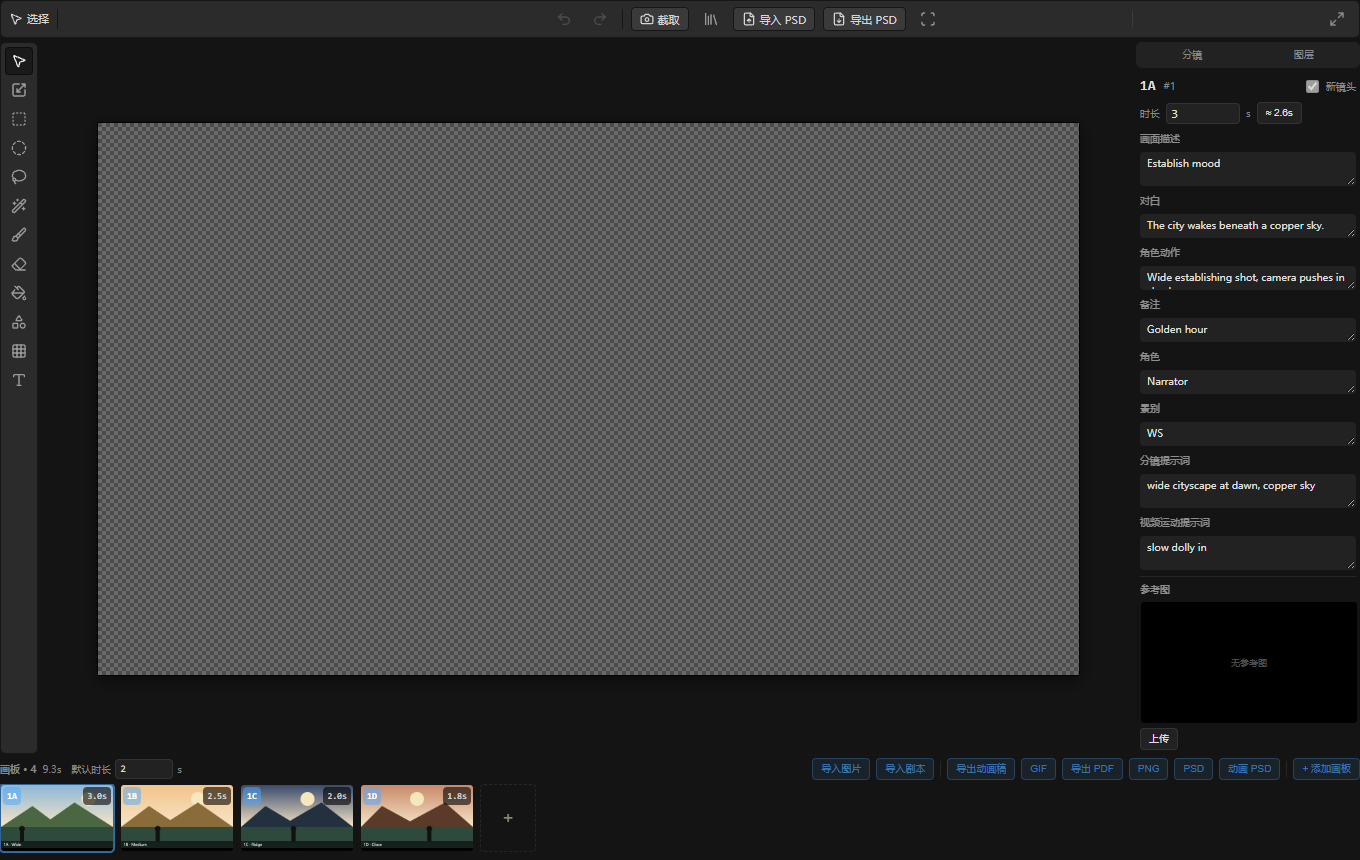
Storyboard Editor in ComfyTV
What this node does
Storyboard Editor is a rich in-browser editor for building a storyboard: an ordered set of shot boards, each a drawable artboard with its own layers plus story metadata (dialogue, action, shot size, prompts, timing). It reuses the whole Layer Editor engine per board, so every panel gets the same brushes, shapes, text, masks and transforms — then adds boards, a timeline, onion-skinning, playback, and a rack of exporters. All drawing and previewing happen live in the browser (no GPU ▶ Run for editing). The editor captures a cover composite and a per-board batch as ComfyTV snapshots, and can render an animatic video. It lives inComfyTV/Input as a creative starting point. Outputs are ComfyTV snapshots, not native tensors — insert a Bridge to feed native ComfyUI nodes (bridges docs).
When to use it
- Block out a sequence shot-by-shot before generating any footage.
- Turn a Fountain/screenplay script or a batch of reference images into a set of timed boards.
- Preview pacing with a playable animatic, with per-shot dialogue captions.
- Hand off a board deck as a PDF, an animated GIF, a ZIP of PNGs, or a layered PSD.
The editor
The layout mirrors the Layer Editor — top toolbar, left tool strip, canvas, right panel — with a storyboard timeline strip added at the bottom. Drawing tools. The same left tool strip and per-tool context toolbar as the Layer Editor (select, transform, marquee/ellipse/lasso, wand, brush, eraser, bucket, shape, warp, text; undo/redo; import/export PSD; fit view). Each board is edited exactly like a Layer Editor document. Storyboard toolbar extras (top-right). Composition guides you can overlay on the canvas — center cross, rule-of-thirds, and an 8×8 grid — plus flip horizontal / flip vertical for the board. Then onion-skin toggles — onion previous (tinted ghost of the prior board) and onion next — a captions toggle, a loop toggle, and a play / stop button for the animatic. Finally the fullscreen toggle. Right panel — Board vs Layers tabs. Switch between the layer stack (identical to the Layer Editor’s) and the Board panel. The Board panel edits the current shot’s metadata: a New shot flag, per-board duration in seconds (with a suggested-duration button), and text fields for scene purpose, dialogue, action, notes, character, shot size, image prompt, motion prompt. It also holds a reference image slot you can upload, add to the canvas, or clear. Playback overlay. Play fills the canvas with each board in sequence, honoring per-board durations and the loop toggle, and (with captions on) shows the board’s dialogue plus a shot label and position counter. Timeline strip (bottom). Shows board count and total duration, a default duration field, and the import/export rack: import from upstream storyboard, import from upstream images, import images (files), import script (Fountain), and exporters — animatic (video), GIF, PDF, PNG (ZIP of boards), and PSD (artboards or animation).Workflow / step by step
- Add the Storyboard Editor node (default board size 1280×720).
- Populate boards — import from an upstream
storyboardorimagesinput, import a Fountain script, drop in image files, or start blank and add boards. - On each board, draw and annotate with the Layer Editor tools, and use the Board tab to fill in dialogue/action/prompts and set the shot’s duration; mark shot boundaries with New shot.
- Refine composition using the guides, flips, and onion-skin against the neighboring boards.
- Press play to review the animatic; turn on captions and loop as needed.
- The editor captures a cover composite (image) and one composite per board (images). Export an animatic to fill the video output, or download PDF/GIF/ZIP/PSD.
- Wire the outputs downstream — e.g. feed the per-board images into image/video generation.
Inputs and outputs
The board document (
board_state), artboard width/height, capture URLs, and animatic URL are stored internally on the node, not wired sockets.
Tips
- The Board vs Layers tabs share the same canvas — Board is for the shot’s story data and reference; Layers is for the drawing stack, exactly like the Layer Editor.
- Onion-skin tints the previous board warm and the next board cool, so you can align action across cuts; toggle each direction independently.
- Per-board duration overrides the timeline’s default duration; the ≈ suggestion button fills a duration derived from the board’s content.
- The video output only appears after you run an animatic export; PDF/GIF/ZIP/PSD are downloads, not graph outputs.
- Import script parses Fountain text into scenes; import from upstream pulls in a structured storyboard or an image batch already in your graph.
Related nodes
- Layer Editor — the single-image editor whose engine each board reuses.
- Storyboard Stage — produces the
COMFYTV_STORYBOARDstructured shot list you can import here. - Image / Video Stage — natural downstream consumers of the per-board images.